The first thing you must do is "get connected" to the internet. The two primary connection types we will deal with are Dial-up and Wireless. With dial-up the biggest advantage of an internet connection is its low cost. However, increased competition in the high-speed internet market has driven broadband prices down making high-speed pricing more comparable.
The disadvantage is that dial-up is the slowest internet connection available. Slow connections are limited in that you may not be able to access some content intended for faster connections.
Unlike broadband which is always connected and ready, dial-up connections usually take a few minutes to dial-up and establish a connection with your internet service provider before you are able to connect to the internet.
Dial-up requires that you tie up a phone line when connected to the internet. You can add an additional phone lone dedicated to internet access, but you'll most likely have to pay your phone provider for the second line.
With fixed wireless the advantage is that your wireless internet connections are capable of extremely high speed.
The disadvantage is that set-up costs may be expensive depending on the hardware required by your wireless Internet service provider.
Once you have your high speed Internet connection up and running, you'll probably want to add a wireless router. A wireless router will allow you to access your internet connection without the wires. A wireless router will open up a whole new world of amazing products.
You may want to protect your wireless network from unauthorized users through one of the wireless network security encryption methods. You need to be aware of the ability of other computers to access your cyber communication that is private and personal.
The choice you make depends on what is important to you. Be sure that you are not only protected but you get the capability of the service you want from your own personal needs.
Tuesday, December 28, 2010

How to Get the Best Plan of Your Broadband
If you find yourself reading this post online, then odds are you are no stranger to the vast wilderness that is the internet. Uploads, downloads, blogs, videos, podcasts, pictures, forums, games, news, email, animation, flash, webmail, webcams and music can all make for a vast and limitless real-time environment that is constantly changing. It is often the seemingly inexhaustible amount of resources that has many net users tearing out their hair due to strolling performance and extended loading time for content. However, in many cases, the real culprit is not the content or the website itself, but rather the combination of an ill-equipped connection speed and an internet plan that does not adequately address specific user needs.
Before roaming free in the World Wide Web, every internet user must first choose a connection plan and connection speed that will be able to accommodate both their budget and their user needs. The following article seeks to outline some of the basic areas that novice users should address when deciding to connect to the internet. For some, it may seem like commonsense, but for those suffering easily avoidable headaches and long load times it may just make a world of difference.
Connection Speeds
Before beginning it would first be wise to explain the two types of connection speeds and how they fundamentally differ. All methods of internet usage around the globe only use either one or the other of these types of connections.
Kbps: Is the common acronym for ‘Kilobits per second’. A Kilobit is one thousand bits of data – a ‘bit’ being the most fundamental form of binary code that makes up all information available both online and on your home PC. Essentially, a ‘bit’ is the building block of all computer technology and communication. In layman’s terms it is simply the combination of 1s and 0s that form the language of computers.
Mbps: A much larger unit of data, Mbps refers to the term ‘Megabits per second’. A Megabit is one million ‘bits’. This form of data transference is used by every internet connection above Dial-Up speed.
Types of Connection
Dial-Up: The most basic connection available, a Dial-Up connection uses the existing phone line in a business or household to transfer data at around 56Kbps. This is the slowest connection currently available in Australia and is in the process of steadily being outdated due to faster connections being more widely and readily accessible for a lower cost.
ISDN: Is anIntegrated Services Digital Network and is twice the speed (at 128Kbps) of Dial-up. It can be difficult to obtain due to its reliance on what is fast becoming outdated technology. ISDN was essentially the technological stepping stone between Dial-Up and ADSL.
ADSL: Stands forAsymmetric Digital Subscriber Line, also most commonly referred to when the term ‘broadband’ is used, and is a one-way connection where the download speed is much faster than the upload speed. This is a common trap for the average consumer because the speed of the connection is always referenced in terms of the maximum download speed (i.e how fast a page loads up / time it takes to save a file), rather than the much slower upload speed (i.e how long it takes to send an email / send a file to another computer)
Cable: The fastest connection available for both business and residential use (Fibre Optic connections, which are the next level up, are currently exclusive to business due to the high cost of installing and maintaining). Cable internet uses a similar system of connections to most pay television providers. It is completely separate to the household phone line and connection speed is substantially faster for both uploads and downloads. However, speed can be compromised by the number of separate households located in close proximity that use the same cable as only one cable is generally provided for a whole neighborhood. Generally cable runs at around 1.5 – 6 Megabits of bandwidth which is substantially faster than ADSL.
Connection Plans and Common Traps
To maintain a steady and consistently fast connection you need to take care in the selection of your plan. Having selected the telecommunications company with which you wish to subscribe for the service you then need to select a plan based on the cost of installing and maintaining your connection, the type of connection you wish to have installed, the speed of the connection, the download limit, if any, and the consequences if that download limit is exceeded.
The download limit or ‘shaping’ of your plan dictates how much information you can access from the internet within a month before being subjected to either additional costs (which can be significant) or slower connections (usually Dial-up).
According to Miles Humphrys, IT Manager for Corporate Executive Offices, one of the largest international chains of serviced offices throughout the Asia Pacific Region, a common pitfall when deciding on your internet plan is, “not knowing what it is that you, or your business, wish to use the connection for”. According to Mr Humphrys, “Before connecting the business or user must first decide what their primary methods of usage will be. Will they be sending a substantial amount of emails? Downloading live videos or music? Or simply surfing for information? All these factors must be weighed up before signing up to a limited connection or one with a capped amount of usage. Nothing is more frustrating for a business, or home office, than being crippled by an incredibly slow connection because they have gone over their download limit during the day-to-day requirements of the business or user.”
If you are unsure of the amount of data which you are likely to download in a month make sure you select a plan that gives you sufficient download capacity to enable you to then monitor your usage without fear of exceeding your limit. Make sure that your plan is flexible enough to then change if your download requirements are either substantially less or more than you expected.
“The one piece of advice that I would give for anyone looking to connect to the internet either now or in the future, above all, is to - read the fine print! The things to look out for are capped plans, download limits, shaping and especially ‘extra charges’. If you see anything that looks a little odd, always ask questions or consult an IT Professional”, concluded Mr Humphrys.
Before roaming free in the World Wide Web, every internet user must first choose a connection plan and connection speed that will be able to accommodate both their budget and their user needs. The following article seeks to outline some of the basic areas that novice users should address when deciding to connect to the internet. For some, it may seem like commonsense, but for those suffering easily avoidable headaches and long load times it may just make a world of difference.
Connection Speeds
Before beginning it would first be wise to explain the two types of connection speeds and how they fundamentally differ. All methods of internet usage around the globe only use either one or the other of these types of connections.
Kbps: Is the common acronym for ‘Kilobits per second’. A Kilobit is one thousand bits of data – a ‘bit’ being the most fundamental form of binary code that makes up all information available both online and on your home PC. Essentially, a ‘bit’ is the building block of all computer technology and communication. In layman’s terms it is simply the combination of 1s and 0s that form the language of computers.
Mbps: A much larger unit of data, Mbps refers to the term ‘Megabits per second’. A Megabit is one million ‘bits’. This form of data transference is used by every internet connection above Dial-Up speed.
Types of Connection
Dial-Up: The most basic connection available, a Dial-Up connection uses the existing phone line in a business or household to transfer data at around 56Kbps. This is the slowest connection currently available in Australia and is in the process of steadily being outdated due to faster connections being more widely and readily accessible for a lower cost.
ISDN: Is anIntegrated Services Digital Network and is twice the speed (at 128Kbps) of Dial-up. It can be difficult to obtain due to its reliance on what is fast becoming outdated technology. ISDN was essentially the technological stepping stone between Dial-Up and ADSL.
ADSL: Stands forAsymmetric Digital Subscriber Line, also most commonly referred to when the term ‘broadband’ is used, and is a one-way connection where the download speed is much faster than the upload speed. This is a common trap for the average consumer because the speed of the connection is always referenced in terms of the maximum download speed (i.e how fast a page loads up / time it takes to save a file), rather than the much slower upload speed (i.e how long it takes to send an email / send a file to another computer)
Cable: The fastest connection available for both business and residential use (Fibre Optic connections, which are the next level up, are currently exclusive to business due to the high cost of installing and maintaining). Cable internet uses a similar system of connections to most pay television providers. It is completely separate to the household phone line and connection speed is substantially faster for both uploads and downloads. However, speed can be compromised by the number of separate households located in close proximity that use the same cable as only one cable is generally provided for a whole neighborhood. Generally cable runs at around 1.5 – 6 Megabits of bandwidth which is substantially faster than ADSL.
Connection Plans and Common Traps
To maintain a steady and consistently fast connection you need to take care in the selection of your plan. Having selected the telecommunications company with which you wish to subscribe for the service you then need to select a plan based on the cost of installing and maintaining your connection, the type of connection you wish to have installed, the speed of the connection, the download limit, if any, and the consequences if that download limit is exceeded.
The download limit or ‘shaping’ of your plan dictates how much information you can access from the internet within a month before being subjected to either additional costs (which can be significant) or slower connections (usually Dial-up).
According to Miles Humphrys, IT Manager for Corporate Executive Offices, one of the largest international chains of serviced offices throughout the Asia Pacific Region, a common pitfall when deciding on your internet plan is, “not knowing what it is that you, or your business, wish to use the connection for”. According to Mr Humphrys, “Before connecting the business or user must first decide what their primary methods of usage will be. Will they be sending a substantial amount of emails? Downloading live videos or music? Or simply surfing for information? All these factors must be weighed up before signing up to a limited connection or one with a capped amount of usage. Nothing is more frustrating for a business, or home office, than being crippled by an incredibly slow connection because they have gone over their download limit during the day-to-day requirements of the business or user.”
If you are unsure of the amount of data which you are likely to download in a month make sure you select a plan that gives you sufficient download capacity to enable you to then monitor your usage without fear of exceeding your limit. Make sure that your plan is flexible enough to then change if your download requirements are either substantially less or more than you expected.
“The one piece of advice that I would give for anyone looking to connect to the internet either now or in the future, above all, is to - read the fine print! The things to look out for are capped plans, download limits, shaping and especially ‘extra charges’. If you see anything that looks a little odd, always ask questions or consult an IT Professional”, concluded Mr Humphrys.
Saturday, December 25, 2010
Cisco CCNA / CCNP Home Lab Setup: How To Configure Reverse Telnet
Occasionally, during your CCNA and CCNP studies, you'll run into a term that just doesn't quite make sense to you. (Okay, more than occasionally!) One such term is "reverse telnet". As a Cisco certification candidate, you know that telnet is simply a protocol that allows you to remotely connect to a networking device such as a router or switch. But what is "reverse telnet", and why is it so important to a Cisco CCNA / CCNP home lab setup?
Where a telnet session is started by a remote user who wants to remotely control a router or switch, a reverse telnet session is started when the host device itself imitates the telnet session.
In a CCNA / CCNP home lab, reverse telnet is configured and used on the access server. The access server isn't a white box server like most of us are used to; an access server is a Cisco router that allows you to connect to multiple routers and switches with one session without having to move a rollover cable from device to device.
Your access server will use an octal cable to connect to the other routers and switches in your home lab. The octal cable has one large serial connector that will connect to the access server, and eight rj-45 connectors that will connect to your other home lab devices. Your access server then needs an IP Host table in order to perform reverse telnet.
An IP Host table is easy to put together (and you better know how to write one to pass the CCNA!). The IP Host table is used for local name resolution, taking the place of a DNS server. A typical access server IP Host table looks like this:
ip host FRS 2007 100.1.1.1
ip host R3 2003 100.1.1.1
ip host R1 2001 100.1.1.1
ip host R2 2002 100.1.1.1
ip host R4 2004 100.1.1.1
ip host R5 2005 100.1.1.1
ip host SW1 2006 100.1.1.1
interface Loopback0
ip address 100.1.1.1 255.255.255.255
no ip directed-broadcast
This configuration will allow you to use your access server to connect to five routers, a frame relay switch, and a switch without ever moving a cable. When you type "R1" at the console line, for example, you'll be connected to R1 via reverse telnet. If you have a smaller lab, an access server is still a real timesaver and an excellent investment. And by getting a static IP address to put on your access server, you can even connect to your home lab from remote locations!
Where a telnet session is started by a remote user who wants to remotely control a router or switch, a reverse telnet session is started when the host device itself imitates the telnet session.
In a CCNA / CCNP home lab, reverse telnet is configured and used on the access server. The access server isn't a white box server like most of us are used to; an access server is a Cisco router that allows you to connect to multiple routers and switches with one session without having to move a rollover cable from device to device.
Your access server will use an octal cable to connect to the other routers and switches in your home lab. The octal cable has one large serial connector that will connect to the access server, and eight rj-45 connectors that will connect to your other home lab devices. Your access server then needs an IP Host table in order to perform reverse telnet.
An IP Host table is easy to put together (and you better know how to write one to pass the CCNA!). The IP Host table is used for local name resolution, taking the place of a DNS server. A typical access server IP Host table looks like this:
ip host FRS 2007 100.1.1.1
ip host R3 2003 100.1.1.1
ip host R1 2001 100.1.1.1
ip host R2 2002 100.1.1.1
ip host R4 2004 100.1.1.1
ip host R5 2005 100.1.1.1
ip host SW1 2006 100.1.1.1
interface Loopback0
ip address 100.1.1.1 255.255.255.255
no ip directed-broadcast
This configuration will allow you to use your access server to connect to five routers, a frame relay switch, and a switch without ever moving a cable. When you type "R1" at the console line, for example, you'll be connected to R1 via reverse telnet. If you have a smaller lab, an access server is still a real timesaver and an excellent investment. And by getting a static IP address to put on your access server, you can even connect to your home lab from remote locations!
Tuesday, December 21, 2010
The NEOS Concept
 This enclosed motorcycle called NEOS is another cool futuristic vehicle to have. Using the latest 3-phase AC induction motor and lithium battery tech, the NEOS provides power while being economical and green. Check out the full spec below:
INTERNAL FEATURES INCLUDE:
- A LARGE AND SMALL STORAGE COMPARTMENT
- LEATHER PADS FOR KNEE AND ELBOW COMFORT
- 2 X COLOUR HEADS UP DISPLAY DIALS
EXTERNAL FEATURES INCLUDE:
- LED AND XENON LIGHTS
- VEHICLE DETECTION SENSES
- REVERSE AND SIDE MIRROR CAMERAS
- FRONT AND REAR INDICATORS
- LED LOCK AND UN-LOCK INDICATOR
- ROTATING POLYCARBONATE DRIVER CANOPY THAT CAN ALSO BE DETACHED
- ELECTRIC POWER INPUT FOR RECHARGING
- WHEEL GUARDS
- UNIT SHELL COMPRISES OF HIGH IMPACT ABS PLASTIC AND CARBON FIBRE
- BREMBO RADIAL MOUNTED FORGED 4 PISTON CALLIPERS
- POWERED BY LIQUID COOLED 3 PHASE AC INDUCTION MOTOR WITH A RANGE OF 260KM FULLY CHARGED AND WITH A RECHARGE TIME OF UNDER 2 HOURS @ 240V
- LIGHT WEIGHT ALUMINIUM OR MAGNESIUM FRONT AND REAR WHEELS (6” X 19”) & (9” X 21”) RESPECTIVELY
POWER, RANGE(KMS)
- COLOUR TOUCH SCREEN DISPLAY WITH AUTOMATIC MOBILE PHONE SYNC
- RADIO AND MP3 CAPABILITIES
- GPS FEATURE
- SIDE MIRROR AND REVERSE CAMERA VIEWING
- INTERNAL SPEAKERS AND MICROPHONE FOR HANDS FREE MOBILE ACCESS ALONG WITH INTERACTION WITH SIDECAR USER
- WINDSCREEN VEHICLE PROJECTION FOR LANE CHANGE WARNINGS
- PUSH START BUTTON SYNCED WITH ‘NEOS’ KEY
- JOYSTICK CONTROLS
SIDECAR AND STORAGE COMPONENT FEATURES
EXTERNAL FEATURES INCLUDE:
- EXTRA SURROUNDING VEHICLE SENSES
- REAR INDICATORS AND REAR BRAKE LIGHT
- FRONT LED LIGHT
- ROTATING AND DETACHABLE POLYCARBONATE CANOPY
- EXTRA LARGE STORAGE COMPARTMENT FOR UP TO 80LTRS.
- OPENING DOOR/CANOPY
- MAIN SHELL IS COMPRISED OF HIGH IMPACT ABS AND CARBON FIBRE
INTERNAL FEATURES INCLUDE:
- LEATHER SEAT
- SEAT BELT
- SPEAKERS AND MICROPHONE TO CONVERSE WITH DRIVER AND LISTEN TO MUSIC
- HANDLE TO ASSIST WITH ENTRY
- SAFETY FEATURES INCLUDE
- A COMPLETE LIGHT WEIGHT ALUMINUM ROLL CAGE/SAFETY CELL FOR DRIVER
- A FULLY ENCLOSED SHELL FOR BOTH DRIVER AND SIDECAR OCCUPANT
- SIDE CURTAIN AIRBAGS AND DRIVER FRONT AIRBAG
- SIDE CURTAIN AIRBAGS FOR SIDECAR POD
- ABS
- ESC
- TRACTION CONTROL
- REVERSING AND SIDE MIRROR CAMERAS
- SURROUNDING VEHICLE SENSES
- LEATHER PADDING FOR KNEES AND ELBOW


Saturday, December 18, 2010
Nuclear Camera
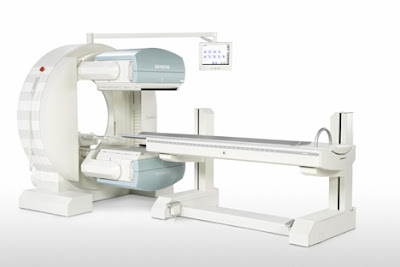 Have you ever wondered how doctors are able to see inside a living human body? Doctors don’t use x-ray vision like Superman, though that would be pretty interesting. Instead, doctors use a machine called a nuclear camera, or gamma camera.
 History of the Gamma Camera
The first gamma camera, originally called the Anger camera, was developed by Hal Anger in 1957. The first gamma cameras did not rely on the continuous motion of radioactive isotopes as the present day gamma cameras do. Gamma cameras were also not as commonly used as they are today. Most Nuclear Medicine Departments have a gamma camera available. Technological developments have greatly improved the gamma camera over time. Gamma cameras now allow for three-dimensional imagery, something that Hal Anger could only dream of.
What is the purpose of a Gamma Camera?
Gamma cameras can be used to detect, track, and monitor many things. Blood clots can be found by monitoring radioactive isotopes in the blood vessels. Peripheral artery diseases can be detected by injecting isotopes into the arteries. Doctors can find traces of cancer or holes in organs by using a gamma camera. A gamma camera can save lives by helping doctors see inside the body and find what the problem is.
How does a Gamma Camera work?
There is more to a gamma camera than a patient to lay on the table and a doctor to push a button. Radioactive isotopes must be entered into the body in order for the gamma camera to take any images. The isotopes are medically injected, inhaled, or ingested. The radioactivity emitted by the isotopes is detected by the nuclear camera in the form of gamma rays. The gamma rays travel through low-density objects in the body. Dense objects such as lead block the gamma rays, making it possible to see inside the human body. The images are captured by the gamma camera and can then be analyzed on a computer screen and printed off for further examination and study.
While most cameras capture memories of family and friends, a gamma camera captures images that can save the lives of our family and friends.
Life's Good with the LG Optimus 7!
This is a Sponsored post written by me on behalf of LG. All opinions are 100% mine.

Building on Microsoft's new operating system, the LG Optimus 7 offers consumers a whole new experience of mobile life. It offers the glance and go experience of Windows Phone 7 combined with unique features only available on the LG devices. These include the DLNA-based Play To, augmented reality and Voice-to-Text, which can all be added as Live Tiles on the Windows Phone 7 to personalize your device and can be accessed via integrated "Hubs". Its "Play To" feature will let you share multimedia files with other digital devices from the picture, video or music Hubs without having to access other menus. You can display videos and photos captured on LG Optimus 7 from a TV. Not only that, you can also enjoy music on your phone through your favorite speakers without wires. The 720p HD video resolution offers recording and playback of stunning visual quality with the 16:9 aspect capture and playback for shooting and viewing movies in cinematic style and it's ideal for sharing online through social media.
The advanced 5MP camera offers a host of technological enhancements from LG such as Intelligent Shot, which lets users take the perfect photo without having to adjust camera settings, and Panoramic Mode for stitching together a full 360-degree landscape scene. With the expansive 3.8 inch WVGA LCD display you can capture every detail in a photo with its 800x480 pixels. The screen size makes the Optimus 7 large enough for convenient web surfing but svelte enough to fit in any back pocket.
The "Voice to Text" feature allows you to communicate without the need for finger input, just speak up and be heard. If you are the owner of this cool phone you'll have the freedom to transcribe your voice into text for updating Facebook and Twitter or composing emails and memos for the experience of convenient, hands-free communication. If you love to shopping or dining outside, the ScanSearch augmented-reality app lays icons of nearby restaurants, cafes and other snack emporia on an image seen through the camera lens. It gets its results from Google or Bing searches, so the content is accurate, but, like most augmented-reality applications, I found it fun for a fleeting moment, rather than truly functional.
For entertainment, owners of the LG Optimus 7 will have direct access to their favorite games and music which brings all entertainment devices together for more convenient enjoyment. You can enjoy a new era of entertainment through the introduction of Microsoft's popular Xbox Live and Zune services. With the generous 16GB of internal memory is enough to store hundreds of MP3 files, hours of video and hundreds of applications. Furthermore, the extra large 1500mAh removable battery is good for hours of Internet browsing, e-book reading or game playing, or for simply talking. So, if you're looking to upgrade to a smart phone that's easy to use and more affordable than the iPhone, the LG Optimus 7 could float your boat.
Monday, December 13, 2010
Internet Access in Airplanes?
 Gone are the days when you have to endure being off-limits and unreachable as you travel hundreds to thousands of miles via airplane. In the past, nobody thought Internet access while on board a plane could be possible. Now, it is not just a target or an aim. Internet connection in airplanes is now among the newest features and add-on services of air carriers.
 Major global airlines are now offering Internet access even while planes are flying. Air carriers are entering into partnership with wireless Internet access providers to provide online connection to people who are on board. The technology is still a new one, but it is one that is fast gaining popularity. Many passengers have been complaining about not being able to access Internet while on flights. Now, those complaints could be all gone.
Many businessmen hate long-haul trips not because of the tediousness and long hours of travel but because they are missing a lot. Some business people prefer to stay online even while away from the office to be able to monitor goings-on in the workplace and to retrieve important data and information. Most of them also want to stay connected via email and online messaging services. Now, no matter how far and how long air travel could get, there is no excuse for not being able to stay online.
While during the 1990s, further improvements in telephone communications was the focus of customer and industry interests, the new millennium has shifted the focus to better Internet access. To date, mobile Internet access has become really popular after being widely deployed particularly at ground level. From there, telecom and air navigation industries are now focusing at offering mobile online connectivity even on a moving plane.
The need for Internet access while on board airplanes come as modern air travelers acknowledge their necessities to acquire more than the simple voice services they usually get to be able to connect to the world even while on journey. Web access provide more complex information-based services like emailing, virtual private networking, and instant messaging to be able to secure reliable access to corporate networks.
How was it made possible? The first and initial phases of the effort involved inter-twined ground access wireless towers. But because this strategy does not yield satisfactory and good results, plus there are limitations on long-haul flights, another way of online connection was sought. Now, most Internet access providers on flights use different satellite services for online transmission. Through using routers and Wi-Fi connection facilities, airplanes are now made online, anyone with a laptop could log online anytime he wants and needs to.
Is the service costly? Because the feature is still new in the airline industry, additional charges of about an average $13 is imposed for anyone who voluntarily applies for the service. Most airlines could still not waive the cost and offer the service for free because Internet access through satellite systems is costing them much. It is said that if not because of the further intensifying competition, airlines would not resort to offering Internet access in flights.
However, the usefulness and reliability could not be underestimated. Internet access provided by planes is really among the most popular, sought-after, and well-raved about features and services offered by airlines and Internet service providers. Many more airlines are expected to follow suit and start offering in-flight Web access.
Types Of VoIP And Their Advantages

In the past, you had to dial the telephone operator’s number to get connected to the number which you desire to reach. Nowadays there is a more innovative way of getting your much needed long distance call. Indeed, you can let pass the use of your cellular phone.
You don’t have to shoulder the burden of the very expensive plans and rates of your mobile phone. Likewise, a main telephone line is not all that you need to place a long distance call. To save your day, companies that offer VoIP are much around to be of service to you.
It is a common knowledge that the cable lines are mainly responsible in transferring the audio data. However, the different types of VoIP make it possible for you to place a very cheap call both locally and internationally. Read on and get to know more about what it offers and how beneficial it can be to you.
Unraveling the Various Types
With its practicality both for home and business use, there is no doubt that VoIP is a common name in today’s modern society. In several countries, it has even turned into a household item. Instead of having a regular telephone line installed in the offices and within the homes, the VoIP phone service is much adhered to.
The following are some of the major classifications of VoIP:
The consumer VoIP. A lot of today’s consumer-based VoIP companies provide free voice calling or cost-efficient services. This is made possible by that of using a certain kind of adaptor which connects to a program or a broadband service which functions like an ordinary main telephone line or a home computer.
This type is a more economical system of getting through the public telephony network. If you happen to notice it, many of the services are provided to you for free. For one, you can call another computer by means of Skype or Yahoo Messenger without any charges.
All that you should have is a steadfast Internet connection, highly reliable microphones, headphones, and speakers. These devices should control the feedback or any type of noise in the background.
The small up to medium sized company VoIP. Typically, small scale businesses prefer to apply the methods that will allow them to save more money on their operations. That is why; the VoIP system proves to be very practical in this line.
Centrex Explained
Centrex is yet another type of a phone service which is utilized by most of the VoIP operated services. It has the full control over the central calls and the switching is conducted inside a box that is usually placed on the wall which then acts as the remote Internet hosting center. The Centrex services have something to do with the desk phones of the customers who connect the calls via the broadband Internet towards the PBX servers.
Among the advantages of the system include the uncomplicated deployment just by the mere plugging of the phones into the Internet system, the lower and cost-efficient rates since the call is made over the web, lesser expenses on the installment because of the removal of the phone switches, and the cheaper rates for the internal phone calls.
With everything that seems to be very much in control, your worries can all go away with the popular types of VoIP. Therefore, take this into consideration as you work on your home or office needs.
Friday, December 3, 2010
LG Electronics Launched the NEW LG Optimus One
This is a Sponsored post written by me on behalf of LG. All opinions are 100% mine.
 Recently LG Electronics launched a smartphone called Optimus One and will be available in over 90 countries via 120 partners. Personally, I find that LG Optimus One phones is quite interesting. This new smartphone by LG focuses on offering instant information search and versatile application packages including Google Mobile Service and even quality application advising functions. Powered by the Android 2.2 "Froyo" OS and optimized for Google Mobile Services, the LG Optimus One has been a big hit with first-time smartphone buyers looking for a high performance and useful applications in a mobile phone. With a fun, user-friendly user interface, the LG Optimus One comes with 320×480 megapixel TFT touchscreen display with 256K colors, a camera with face tracking and smile shot, a 3.2" wide HVGA screen, a long-lasting 1500mAh capacity battery, GPRS class 10, EDGE class 10, HTML browser, Wi-Fi and 3G are available, along with Bluetooth and much more. The smartphone allows for two to three times faster and smoother Internet browsing, web-page loading, application pop-ups and multi-tasking. Not only that, the device also enable professionals to easily sync with Outlook Calendar, while offering portable Wi-Fi hotspots to easily share a single 3G connection. You can also found popular Google Mobile Services including Google Voice Search, Google Voice Actions, Google Goggles, Google Shopper and Google Maps with Navigation inside this smartphone. It also includes the exclusive LG App Advisor, which recommends 10 highly rated applications every two weeks.
Subscribe to:
Posts (Atom)