A touch of a button is all it takes to transfer photos stored in a Flash memory card into the newly launched Photo Safe II, a palm sized portable hard drive. All you have to do is insert a supported memory card into the device, press the download button to start archiving its entire contents in their original file name and file structure, at up to 5Mbps into the storage device. Once it finishes copying, users can erase the data in the memory card and reuse it to keep on shooting.
Photo Safe II supports a variety of memory cards including Compact Flash type 1, xD-Picture Card, Multimedia, Secure Digital (SD), SDHC,miniSD, Memory Sticks (MS), MS Pro, MS Duo and MS Pro Duo. In front, users will see the LED screen that lets them know the status of the device such as battery life, remaining hard drive space and type of card inserted. The Photo Safe II is available in two versions - the 80Gb retails for USD139 and the 160Gb costs USD189.
Miuro is a small robot on two wheels that can play tunes AND follow you around the house, so you never miss a beat! The device is 14 inches wide, weighs 9 lbs, and comes in white, black, yellow, and red. Dock your iPod in Miuro, or stream audio wirelessly from programs such as iTunes. Miuro comes with a remote control, so you can command the robot to move from room to room, and with its built in camera and sensor accessories. Watch video below.
Lots of folks are familiar with the history of the Internet over the past few years. If you'd like a more comprehensive view, go to Hobbes Internet Timeline This site takes you year by year through the development of the Internet from the 1956 Russian launch Sputnik onto the World Wide Web - 1992.
Sony will launch a new PSP "PSP-3000" in October with a high resolution screen and a built in microphone that enables it to be used as a telephone. It can be used to make telephone calls through the Skype service which Sony added to PSPs already on the market earlier this year in an effort to broaden its appeal amid fierce competition with rival Nintendo. The PSP-3000, which will be available in Japan, Asia, North America and Europe, has the basic design of the current PSP Slim and Lite. It comes in three colors : black, white and silver. This new PSP comes with a price tag of USD199.99 in North America, 199 euros in Europe and the price for Asia has not yet been announced.
For those unsuspecting fools out there who don't know what Banzai is, let me explain, its Japanese so don't expect it to be logical, its anything but - its actually what they affectionately call a betting show, however theres no money involved unless you're betting with friends and these aren't the kind of bets you can look up in the form guide, they're wierd bets, let me explain with an example - one of the recent bets was how long will 'Mr.Shake-hands Man' shake Ronan Keatings hand before Ronan gets bored, will it be A. under 30 seconds, B. 30 to 120 seconds or C. over 120 seconds..... oh and thats one of the more saner bets on the show, others have included how many chocolate gateaus a man can leap over in a shopping trolley, which one of these ugly women is really a sex-line operator and will this old lady be able to hit someone in the head with an egg from a great height.
ScreenLife Games is at it again. They launched a new Banzai game. Check it out:
Now you can enjoy the same fun that the audience are experiencing with this Banzai DVD game.The hottest new party game from Screenlife Games, Banzai has players betting plastic sushi on the outcome of absurd stunts taken from the cult-classic TV show of the same name. Players race to fill the betting bowl with plastic sushi pieces using only chopsticks. The winner controls the betting, but the DVD controls the outcome. The person who wins all the sushi wins the game. If you want to give it a try but don't know how to play it, there is more information, including a video at the 'How to play' section of the site.
Recommended for 2 to 4 players or teams, ages 16 and up, Banzai is available online for only USD29.99. You can also download wallpapers (like picture below) or playing Tako-gotchi on the site. If you are a big fan or want to know further about Tako you can add or visit their MySpace page at www.myspace.com/takotheocto. Thanks for reading. :-)
Mozilla recently released the latest version of their flagship product, Firefox 3.0. Internet users are turning to Firefox 3.0 for a more productive and safer online experience. Branded by Mozilla’s site as their "best Firefox yet," the new browser has 15,000 improvements with all the perks of the original still there. You may not have heard about it yet, but Mozilla attempted to break a world record on number of downloads with what they called "Download Day." The jury is still out as to whether or not they broke any records, but not surprisingly, more than 8 million users downloaded Firefox 3.0 on its launch date. With such a following, this is a browser worth looking into.
Mozilla has raised the bar on their award winning internet browser. The new version of Firefox is safer, faster, and more customizable than any other browser around. Have a look at the new Firefox 3.0, it will make your Internet time even more productive!
The Antro Solo prototype invented by a team of Hungarian engineers is a solar, human and gas-electric hybrid vehicle. It is a three seat gas-electric hybrid prototype made entirely out of carbon fiber. With carbon fibre composite panels, the whole thing weighs just 270kg, aiding fuel efficiency further. In order to maximize the efficiency of the vehicle, the designers installed solar panels on the roof. These solar panels store energy in the car's batteries which can be used for short 15-25km trips. One of the most interesting parts is if there hasn't been enough sun to power the batteries, each passenger's seat comes equipped with pedals that can power the vehicles generator. If everyone gets tired of playing "Fred Flintstones", the car can switch to its small combustion engine that is capable of running on petrol or ethanol. It will be all yours for just $18,000 in the year 2012. It does look cool both physically as well as the price but I wonder, if we get a flat tyre how to change it?? There is no removable panels to get to the wheels. Hopefully they will work that out before final release.
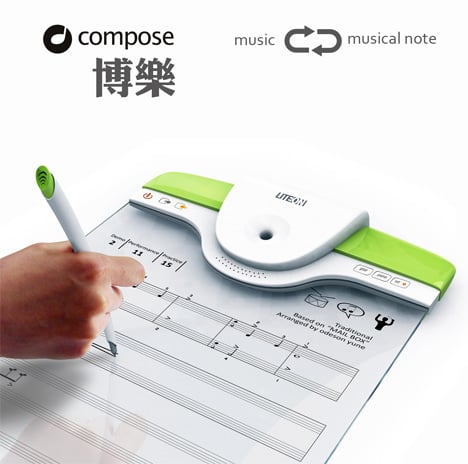
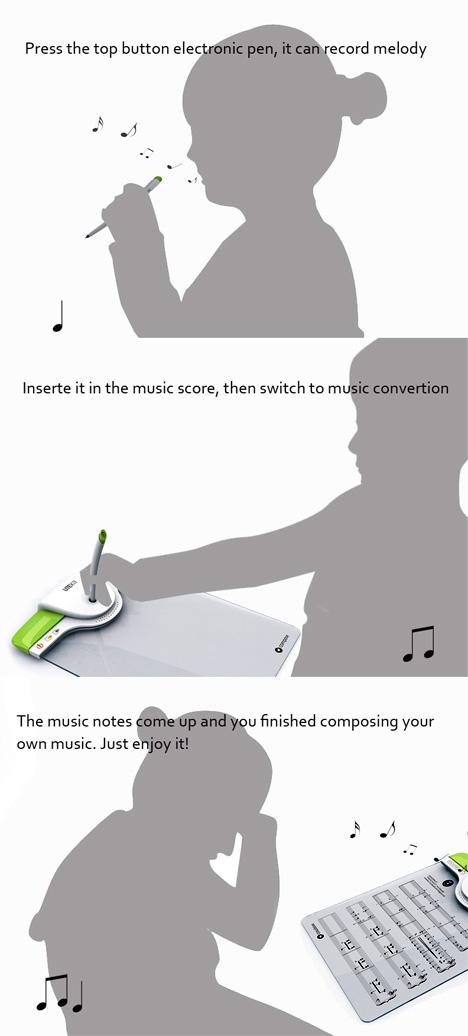
This concept gadget called "Compose" is designed by Ouyang Xi, He Binbin, Zeng Li & Li Bo and allows you to compose your symphonies with ease. If you want to leverage your passion for music to another level, Compose music tablet could be your mobile composition solution. The pen acts as a mic you sing in to it and when docked into the digital paper tablet, your vocal harmonies are automatically transcribed into a score. It also contains libraries for an entire orchestra. This musical gadget is only a design concept at the moment but it might help you record and store your music composition with great ease.
The widespread use of notebooks is the main reason why many computer manufacturers have introduced a wide range of notebook add-ons and other accessories that not only enhance the users computing experience but also make working with a notebook safer. Let's take a look at some of the most exciting notebook accessories you can buy:
Surge Protector Your notebook is an expensive device and it runs on power. More often than not, you use the power adaptor with the wall outlet to charge it. However, an unexpected power surge can damage your notebook's motherboard. This is where a surge protector can help you. Just use it between the wall outlet and the power adaptor for an additional level of safety. It's light, portable and can be carried around in your notebook bag.
Cooling Stand Notebooks are notorious for their heat when you use them for long duration. Although notebooks or laptops are meant for using on lap, it's not actually possible to do so unless you use a cooling stand between your notebook and you lap. A notebook cooling stand will keep your notebook cool with a built-in fan. Besides, some cooling stands can also enhance the cooling convection and help your laptop save power. If you are working for long duration on notebook, cooling stand is must-have for you.
Laptop Speakers If you want to watch any Hollywood action-packed flick on your notebook, but its sound quality is just not as impressive, just add a pair of small and portable speakers to your notebook and experience the enhanced sound quality on your notebook. They are portable and can be carried around wherever you go.
Bluetooth GPS A Bluetooth GPS (Global Positioning System) is ideal for those who use GPS device to keep track of certain things. While a full-fledged GPS device may seem expensive to you, you can use this Bluetooth GPS with your notebook with the help of and internet wireless modem and Google Map installed on your notebook.
The Stand Notebooks needn't always be used on the lap. At times, you may want to use it like a desktop PC. A stand has been designed to help your notebook prop up on a desk and use it with a full-size USB keyboard. When you are done with your work, you can disconnect you USB keyboard and go.
Notebook Bagpack If you are techno junky and prefer to carry most of your devices including your notebook and its accessories, a bagpack is the just the one for you. Light in weight and stunning in design, a notebook bagpack lets you carry your digital world around with you.
As a result of the slashing price of the notebooks, more and more people are gaining access to using these portable computing devices these days. Be it a student, a working professional or a businessman, everybody prefers notebook over a desktop computer for its portability factor.
The "Personal Pocket Safe" was designed to empower even the most novice technology user with the latest advancements in digital organization, while knowing their personal data is stored as securely as possible. This personal pocket safe is like a safety deposit box to hold your critical digital information, including credit card and bank account numbers and all your passwords. It is a USB drive with a numeric keypad and encryption. After you enter your four digit code, you have 30 seconds to insert the device into a computer before it locks. It also locks if it sits idle in the computer for more than three minutes. All the necessary software is on the drive and it can be used on any PC without leaving a trace. The proprietary software found on Personal Pocket Safe requires no software installation and provides fields for the digital compartmentalization of information and documents such as internet passwords, bank statements, credit card bills, passports, drivers licenses and other important data that powers the lives of today's consumer.
One of the primary causes of PC problems and irritating errors is deleting files. For many of us, when we see a program we don't recall or see a file we deem unimportant, we're quick to delete and erase it. What many of us don't realize is these seemingly harmless actions can result in headaches and errors further down the line. Windows registry errors are a result of broken file paths, missing extensions and basically any interruption in our operating system. Downloading free trials and new software is a common practice for any computer owner. But, erasing unwanted programs isn't as easy as the install process. There are plenty of things to keep in mind before we click "delete":
- The best place to uninstall a program is through the Control Panel’s "Add/Remove" Program List.
- Always double check you clicked on the right program box before you choose to remove it. At times, several programs are checked as a default. You wouldn’t want to delete your anti-virus software or anything like that.
- If you're prompted to delete a shared drive, don’t delete it! This was help prevent future error messages, in case you remove a file another software program relies on.
- If the program you want to delete isn't listed under "Add/Remove", go to Programs and look for the specific software folder. Most have a folder called Manual Uninstall which will help you removed the program.
- If you don't recognize a program in your "Add/Remove" folder, don't jump and get rid of it. It may have a strange name (leaving you fearful of some virus or worm) but chances are, it's meant to be there. Consult with someone who knows PC's or browse the Help database.
By: John Mahoney Website design is an intricate part of the Internet as it is what constructs its body. From the early days when people barely understand it to the present when HTML and other languages are being taught to people as young as grade school students. While web technology is still evolving as we speak, the foundations of website design and its undeniable importance will never be extinguished.
Basically, website design is the all-important process of conceptualizing, planning, modeling, and creating what is known as the main delivery vessel of media content via the Internet, which takes form due to the use of markup languages and other technologies. The resulting product is then made suitable for conversion and display by a web browser or any other such software.
The delivery of content with website design involves many different implementations like markup languages (HTML, XHTML, XML), plug-ins (Flash, QuickTime Java), and so on. These are used to encode and lay out different forms of media like text, images, videos, Flash, and others into a comprehensible medium for viewing. The web pages that we browse through everyday are all results of website design.
The recent improvements on website design include those of web browsers' compliance with W3C standards, which spurred on the use of XHTML and XML in correlation to Cascading Style Sheets (CSS), which has revolutionized the customization of web layouts. This and many other improvements have made website design accessible to web users. Nowadays, anyone can be a webmaster with the right tools and the proper knowledge.
There are two types of pages produced by website design: static and dynamic pages. The former don't change form until manually manipulated, which means that they have to be tended to constantly for updates. The latter, however, change form and content according to input and interaction, as well as changes in environment; including that of the user, time, changes in database, and so on. This means that they adapt to input on the client side, bringing in a more user-oriented development of a website. They involve the use of client-side scripting languages like JavaScript, Jscript, Actionscript, and so on. They usually can be seen in forms of server-side scripting languages like PHP, ASP, JSP, Python, and so on. They can be seen all over the Internet with different functionalities according to purpose.
It all started with the advent of the mainstream Internet brought on by the pioneer Tim Berners-Lee, who published what was to be known as a website on August 1991. He was the first person to combine what was then the main function of the Internet, which was communication (email, Usenet, BBS), along with hypertext. The latter had been used for quite some time, but was limited to browsing information within a single computer. This was the start of the Hypertext Transfer Markup Language, or HTML, which would then revolutionize how information was distributed, giving birth to what came to be known as the information superhighway and ushering in what is now known as the Internet Age.
Nowadays, website design has become a crucial part of any dedicated computer user's skill set. As the Internet continues evolving, so will the different methods implemented into the creation of web pages, continually shifting the way information is distributed throughout the world.
Moller International has developed a concept vehicle that can execute vertical take-off and landing like a helicopter, fly like an airplane and drive short distances on the ground like a car. This innovative vehicle, called the M400 Skycar, is capable of reaching speeds of up to 375 MPH. Since it is airborne, the Skycar is not restricted by road speed limits or by traffic jams. The Skycar will be able to take off and land vertically. Using a principle similar to that of the Harrier jump jet, the Moller M400 incorporates a patented thrust deflection vane system that redirects thrust, enabling it to hover or to take off and land vertically from almost any surface. Initial test cars will need trained pilots, but Moller's vision is of automated skyways where the navigational computers do all the work, and Moller's design calls for three computers to assure redundancy. If successful, the M400 Skycar could be the next big step in the field of personal transportation.
If you want to stop people from snooping in your Gmail when you're using a public WiFi connection, you should use an option that Google began offering last month ; a security setting that will switch your Gmail use to an encrypted protected connection.
When you log in to Gmail, click "Settings" link at the top right of the page, scroll down until you see a "Browser connection" category and click the button next to "Always use https." From then on, your Gmail sign-in and everything else you read or write at this site will be digitally scrambled as it flows from Gmails servers to your browser and back. This is in fact a great feature of GMail, which make sure that your private, personal and intimate mails are not being read by a man in the middle of the network.
The sheer number of different eye corrective surgeries available can be overwhelming at times. And since the matter concerns the eyes, regarded by many as the most important of the five senses, it becomes highly essential that you carry out a basic research of the procedures available. This would certainly aid you in selecting the most feasible and effective treatment. It is also imperative that you have a grasp of how LASIK vision correction works, since LASIK is the most prevalent type of eye surgery.
Laser Assisted In-Situ Keratomileusis or LASIK is the most commonly performed refractive surgery procedure. Especially recommended for treating nearsightedness, it consists of cutting a flap in the cornea in order to carve the tissue underneath and give it the desired shape. The eye surgeon may either use a microkeratome (a precision surgical instrument) or a laser to cut a flap of the corneal tissue. Then onwards, the underneath tissue is reshaped with the aid of the excimer laser (a high-precision ultraviolet chemical laser).
All in all, LASIK eye surgery is relatively less complicated than other kinds of surgery. However, if carried out in an imprudent fashion, LASIK eye surgery may cause an irreversible damage that would make you repent for the rest of your life. Therefore it is gravely necessary to choose the best surgeon available. There are various ways that help you locate and choose the best surgeon in your vicinity. Recently I came across LASIK information site and found that it is such a well-established surgery site. If you want to know further about it, you can go to the LASIK information site. Just go through the recommended resources and you will surely find what you need.
This Nikon's unique Coolpix P6000 "point-and-shoot" camera has a few odd tricks up its sleeve. While most camera-makers use Bluetooth or Wi-Fi for uploading images to websites, Nikon has added a full size Ethernet port that allows you to plug the camera right into the Internet. The P6000 uploads images whenever it is connected. The GPS feature adds geographical data to every photo but it can be turned off to conserve battery life. The camera has a 4x optical zoom lens and a 13.5 megapixel sensor. It supports light sensitivity up to ISO 6400 and accepts SD and SDHC storage card. The ergonomic button layout has been designed considering finger movements during shooting. It uses the light and durable magnesium alloy on the front surface of the body making it look elegant and desirable.
There are many of us that have made computers our life, there is nearly no work that we ca finish without the help of computers. There are official matters, even personal work too that might be at a halt if your system is not working well. If you are troubled with the systems speed then it is better to find out a solution to increase your PCs performance, simply getting a new PC wont be the best way to solve this problem.
There are a few steps that can be followed and verified if they work or not, well in approximately all the cases these steps are the best solution to handle any problem.
Firstly, check out the PC and see what kind of files you have stored in your PC, are there any such files that you do not want and have installed without any proper use. There are chances that at times such files that are if no use, then even they can also reduce the speed of your computer. If there are such files that you do not use then there is no point keeping these files in your computer the best way is to remove them. This might be a good step in increasing your systems speed.
Secondly, check out the defragmentation that you have done. If you havent defragmented your drives properly then there are chances that there might be an adverse effect o the speed and the performance of your PC. There are chances that your hard drive may turn over crowded and this can slow down your PC searches and performance thus defragmentation is needed to overcome such situation.
Get a proper and more RAM, this is required as RAM is the main aspect that allows the smooth functioning of a computer and thus affects the working d speed. The affect of RAM on performance and speed is well known so its better to get more and quite effective RAM.
Graphics, there are at times chances that this factor might be the culprit behind the reduced speed affects. There are times when any game or any functioning turns slow just because of the graphic that are not appropriate in your computer according to the necessary requirement so getting the best graphic card even checking the graphic property can do the needful.
PSP is one of the greatest gadgets today that features a music enhancement experience, as it integrates it with gaming. It gives the PSP owner a chance to optimize his or her gadget with easy music listening, complete with quality earphones that come from Sony. One can change it however, by their own choice of earphones or headphones as desired. PSP Music Downloads may be acquired from top sites that may have large databases of songs that may be transferred to your PSP. But before checking them out, you may want to know how to transfer files from your computer to your PSP.
Here are some steps:
1- Download music files and make sure that they are in these formats: .mp3, ATRAC3plus, .mp4, .wav or .wma. Music may also come from UMD’s (Universal Media Discs). If you are using Memory Stick Pro Duo, not all of these formats may work or be playable with your PSP.
2- If you already have your music files at hand, you may now transfer them to you PSP through: USB or Memory Stick. If you are going to use a USB cable, all you have to do is plug it into your computer and PSP. If you are going to use a Memory Stick transfer, just make sure you have a Memory Card Reader at hand.
3- If they have been successfully connected and you can see your PSP in the directories available, open the PSP File System. Make a folder, PSP, or any of your desire, and make subfolders inside of it, such as Music, Photos, Videos, etc.
4- Look for the files that you wish to transfer and copy them into the applicable folders. As so with this example, transfer your music files into the Music folder.
5- You may now disconnect your PSP from the computer and play your music files as you wish.
This R2D2 Projection Alarm Clock will be able to tell you the current time in two ways; with large red digits projected on your wall, or from the small LCD display located on the front of the can-shaped astromech droids. While this pint-sized R2 unit can’t display holograms of Princess Leia, he can at least project the current time on your wall. For Star Wars fanatic fans out there, the R2-D2 Projection Alarm Clock from Wesco Limited will be released in October and can now be pre-ordered from Amazon UK for a price of £19.99.
Having the wrong computer settings will produce the "0x800a138f Windows Update Error." The simplest computer settings to change will be correcting the date and time settings. You can refer to Windows XP's "Help and Support" section located on the "Start" menu, on how to change your computer's date and time settings.
An incorrect language setting can also cause the "0x800a138f Windows Update Error." To correct the computer's language settings in Windows XP:
1- Go to Tools 2- Click Internet Options 3- Under the General tab 4- Click Languages
When the "Language Preference" window opens up, click the Add button to add English as the default language.
The "0x800a138f Windows Update Error" can also be repaired, by enabling Secure Sockets Layer in Internet Explorer. To enable SSL 2.0 and 3.0:
1- Click Tools 2- Go to Internet Options 3- Click Advanced Tab 4- Under Security place a checkmark next to SSL 2.0 and SSL 3.0. 5- Press Apply then click OK.
Security Socket Layers are a way to enable secure transmission of data, and can cause update errors. It is also recommended you check your proxy settings in Internet Explorer, if you connect to the Internet using a proxy.
A fourth way in which to repair the "0x800a138f Windows Update Error," would be to disable your antivirus, spyware, and firewall software. Different types of software, such as these, can block access to your computer when connecting to Microsoft.
After exhausting these common ways to repair the "0x800a138f Windows Update Error," and an error message is still received, there are other options to choose from, which hopefully will correct the problem for you.
You can continue repairing the update error by going to your "Temporary Internet Files" folder, and deleting the files contained within it. This can be achieved by doing a general sweep of your computer using "Disk Cleanup" under Start > Accessories > System Tools; However, a more specific removal of the temporary Internet files in Internet Explorer can be accomplished:
1- Go to Tools 2- Click Internet Options 3- On the General tab, 4- Go down to Temporary Internet Files 5- Then click the Delete Files button 6- Afterwards, hit OK
The reason why this repair is needed after changing incorrect computer settings might be due to a corrupted or altered file within the "Temporary Internet Files" folder.
Another option to try is to delete the contents of your Windows Update folder. This is located under the "Program Files" directory on the main hard drive. The reason for deleting all of these files is similar to the previous repair above, and a corrupt or altered file could be causing the "0x800a138f Windows Update Error."
Designer-Hyun Jin Yoon and Eun Hak Lee created a camera phone concept called "The Maple", covered in thin wooden film with touch sensitive buttons that light up through the housing when you touch the phone. The cell phone measures 4.5 x 10.4 x 9.8 cm and is a slider with functions like calling, texting, MP3 player and digital camera. The touch-sensitive sensors located in the back of the housing turn on the backlight, responding to your finger touch, bringing the wood to life. It would probably use the capacitive touch technology, which is a special panel coated with indium tin oxide or a similar material capable to conduct continuous electrical current across the sensor.
The Winglet comes in three sizes (based on weight) and is not yet a production device. It will be tested in two areas of Japan (an airport and resort) later this year. If you ever wish you could just glide along because walking is too much effort, then this Toyota's latest invention is just what you need. Check out video below.
Not all spyware and adware is bad. It is not the same as a virus or a worm. Some of it is there by your permission. In other cases, it may be bundled into a piece of software that you choose to download. It is when it crosses the line and starts reporting things to others that you did not give permission to that it becomes bad. At other times, it can really slow down your computer and even lead to viruses and more serious problems.
What Is Spyware? Spyware is a little program that a company or Web site places on your computer in order to provide information. Several uses of spyware include:
- Advertising - Collecting personal information - Stealing your browser's home page - Accessing certain Web sites without permission - Record browsing habits - Keeping records of your keystrokes - And more.
Spyware is not always bad. In some cases, you may permit it to exist when you download certain software online. You may permit a company to display its ads in order to receive what that company is offering - such as music. It can be bad, though, if it is there without your consent and if it is doing things without your knowledge.
What Is Adware? Adware is a piece of software (a program) that controls what type of advertising you see. In some cases, it collects information about your browsing habits, and then displays ads that are related to the things you have been searching for. Adware is often placed on your computer without your consent. In some ways, adware is merely a form of spyware.
What Can You Do With Spyware and Adware?
You can download spyware and adware removal software that will eliminate many of them that are lurking on your computer. Some software will find more than others will, and you will also want one that can scan and detect adware or spyware in emails. If you are running the latest Windows Vista program, you want to be sure that the spyware / adware software program you get is compatible.
Preventing new spyware and adware from infecting your computer is nearly impossible, but with regular uses of an anti-spyware software program, you can certainly keep it to a minimum. Some spyware removal software acts in real time and prevents new spyware or adware from becoming active as soon as it gets on your computer.
The Taiki is a front-engine and rear--drive sports car powered by a new rotary engine. Taiki means "air" in Japanese. It takes its styling cues from Mazda´s Nagare (flow) design theme, following on from the existing Nagare, Ryuga, and Hakaze concepts. From the dashboard and seats down to the door trim, the interior space creates the dynamic sensation that the flow of the wind is being visually depicted.
This “nailed” USB flash drive from Plankton, features 2GB of internal storage with a weird design. It looks like a nail jammed to your PC or laptop when plugged in. Retails for about $46 each in 1GB storage capacity. Do you think it's worth it?